Alcides Fonseca

40.197958, -8.408312

Posts tagged as Today I Learned

Google Workspace and Email Authentication

My employer added a new spam filtering system (Anubis), which blocks my own personal email. Since I have an old free account in Google Workspaces, I had to figure out what was going on. Apparently, I was not signing the emails with SPF, DKIM and DMARC.

I followed this very simple and direct guide on how to setup it up. And I tested my new configurations using DMARCly.

Now the problem is that I have my Gmail (for Google Workspaces) set up to send emails via my employer’s SMTP account. Yes, I like to have all my email accounts merged in one inbox. I tried to split it last year, but failed miserably as I have plenty of work stuff in my personal email, and I like a single search box for all my emails.

I’ll update this post when I am successful at signing SMTP outgoing emails as well.

TIL: Redirect Emails

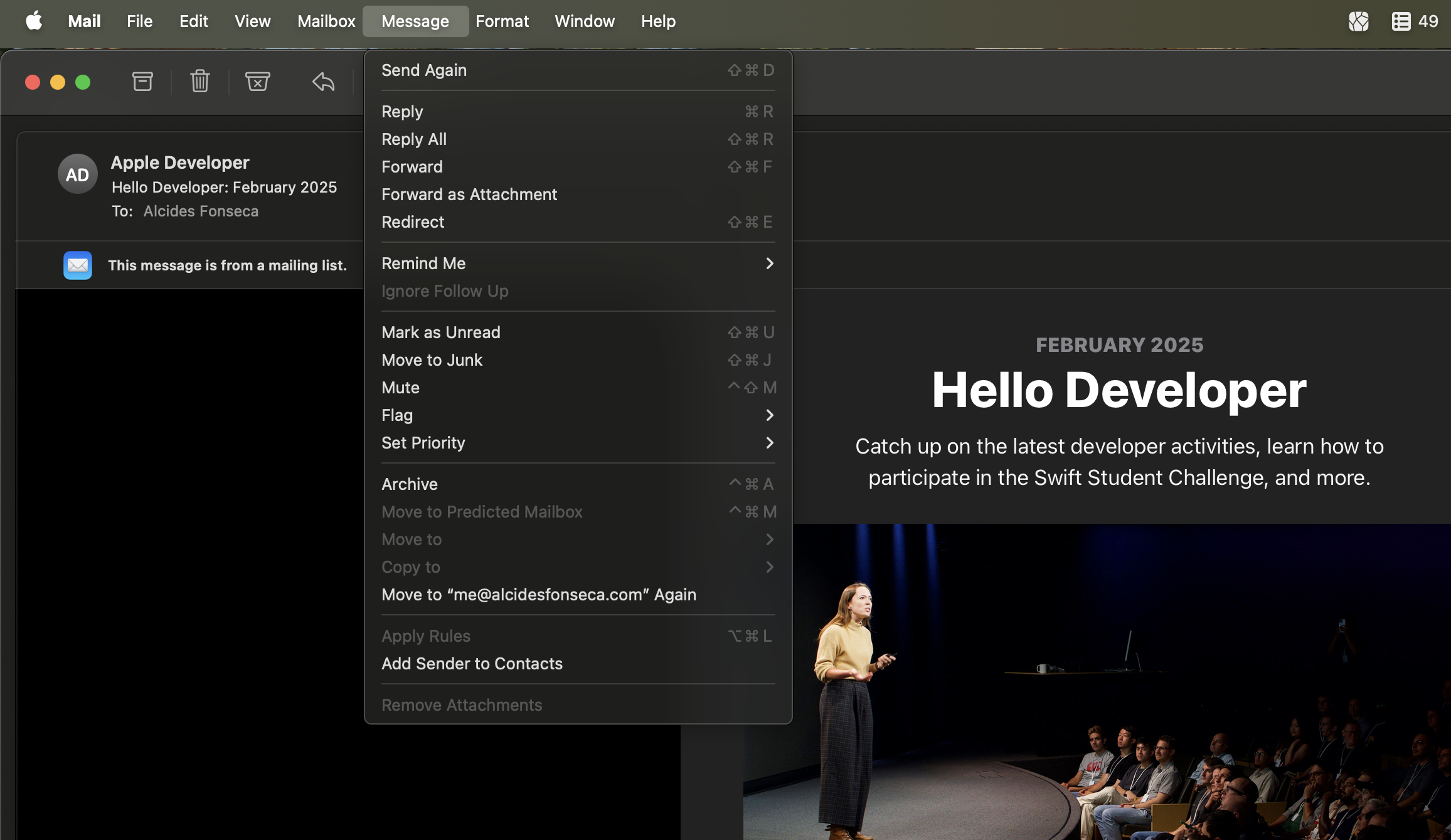
Today I learned that emails have the option to redirect an email to someone else, while keeping you in the loop but having replies going to the original sender.

Only the address of the original sender is shown to the recipient, and the recipient’s reply goes only to the original sender.

Apple Mail.app Documentation (via Chris Krycho)

Hidden Bug: Python class as definition

While preparing geneticengine to participate in the SRBench 2024 run, I was getting None out of a constructor:


def PredictorWrapper(BaseEstimator): def __init__(self, ind: tuple[str, str]): self.ind = ind

def predict(self, X): _, data = self.prepare_inputs(X) return forward_dataset(self.ind0, data) def to_sympy(self): return self.ind1

def mk_estimator(x): print(f“x={x}”) p = PredictorWrapper(x) print(f“p={p}”) return p

Outputting:

x=('np.log(np.power(dataset[:,1], 10.0))', 'log((x1 ** 10.0))')
p=None


Have you found the bug? It took me probably around 1 hour, mainly because I trusted myself too much (and there many other things going on in the code). If you still haven’t found the bug, check the first 3 characters of the code snippet. A function with only other functions inside returns None.

TIL: Flags for macOS's open command

  • open -e opens the item in TextEdit. I basically never want this, and it’s fascinating that it’s built in.
  • open -t opens in your default text editor — for me it’s BBEdit; but whatever you have configured will do. Note: this is not $EDITOR but LaunchServices: a macOS-ism.
  • open -F opens a “fresh” version of the app, not doing window or document restoration. Handy if it’s borked!
  • open -R reveals it in the Finder instead of opening it.
  • open -f reads input from stdin and opens the results in your text editor (weird but… cool, I think).

Read the Manual: open — Chris Krycho

The dict: protocol

Custom URL schemes are the de facto way to launch other apps on iOS and Android ecosystems. Today, while reading about the dict: url scheme, I assumed it was a custom url scheme for the default dictionary app on iOS.

But I was wrong:

The (informal) standard was published in 1997 but has kept a relatively low profile since then. You can understand why it was invented – in an age of low-size disk drives and expensive software, looking up data over a dedicated protocol seems like a nifty idea.

http:, ftp:, and … dict:? — Terence Eden

It now makes sense. This was created in an era where protocols dominated the internet. IRC, SMTP, POP3, HTTP, FTP. Nowadays, it’s all about startups with their own internal protocol that moves too fast, for any standardization to happen. Even big names like Google and Facebook care less about open protocols than they used to.

It’s clear that we need more open-source efforts and funding.

Scope of Generics in Python

Thanks to Continuous Integration, I have found a typing problem in our genetic engine program synthesis framework. It boiled down to me not defining a scope for a type variable.

I started with some code that looked like the following:

with the following error:

main.py:18: error: Argument 1 has incompatible type "P@consume"; expected "P@__init__"  [arg-type]
Found 1 error in 1 file (checked 1 source file)

You can load this example on the MyPy playground if you want to play around with it.

In this case, MyPy is inferring the type of data as dict[str, Callable[[P@__init__], bool], where the key is the init part of the type variable that ends up being different than the use o P inside the consume function. This behavior is because type vars are, by default, bound to the function/method, and not the class. The first step is to actually introduce the explicit annotation for data with the dict[str, Callable[[P],bool]] type, inside Subclass. Now we get a different error:

main.py:17: error: Dict entry 0 has incompatible type "str": "Callable[[P@__init__], bool]"; expected "str": "Callable[[P], bool]" [dict-item]

Now the P type variable in the field annotation is different than the ones inside the method. To actually bind the type variable to the whole class, we need to extend Generic[P]:

Now, we have no typing errors, and we do not even need the explicit type declaration for data.

Most of this issue was due to me not clearly understanding the default behaviors of type variables1. Luckily, if you are able to only support Python 3.12 and upwards, you can use the new, saner syntax. And maybe someday I’ll finish the draft post where I explain why Python’s approach to typing is the best (for prototyping type systems and meta-programming techniques, like we do in GeneticEngine) and the worst (for real-world use).

1 Who the hell creates a type variable through the definition of a variable??

Setting up SLURM for Single-Node usage in Ubuntu 22.04

SLURM is one of the most popular schedulers for clusters and High-Performance Computing (HPC). It takes care of two tasks. Firstly, it prevents everyone from starting processes on the same machine in a way that none of the processes can run successfully (due to not enough RAM, Disk or CPU time). Secondly, it allows to submit a set of programs to multiple computers automatically.

Typically, SLURM is used in a single, weaker computer (called the login node). Users submit jobs (a single program that can be executed many times, in parallel) and these jobs are scheduled in more power machines, which the user has no access to (for consistency sake).

These instructions are for the case where you want SLURM controlling a single computer (node). This is useful when you do not have a cluster, but a single powerful machine. Many of the instructions are taken from How to quickly set up Slurm on Ubuntu 20.04 for single node workload scheduling.

Install SLURM

sudo apt update -y
sudo apt install slurmd slurmctld -y
sudo mkdir /etc/slurm-llnl/
sudo chmod 777 /etc/slurm-llnl
sudo mkdir /var/lib/slurm-llnl/
sudo mkdir /var/log/slurm-llnl/
sudo chmod 777 /var/lib/slurm-llnl/
sudo chmod 777 /var/log/slurm-llnl/

And update the permissions to your liking.
Then we need to create two files: /etc/slurm-llnl/slurm.conf and /etc/slurm/slurm.conf. They should be the same, but they are in two different locations because of the multimode support (not in use in our scenario). As such, I end up creating a soft link between the two:

sudo ln -s /etc/slurm-llnl/slurm.conf /etc/slurm/slurm.conf

Now we edit the contents of /etc/slurm/slurm.conf and of /etc/slurm/gres.conf to the following:

To fill in the last line of slurm.conf, you can run: slurmd -C

Note that this configuration sets up two Nvidia A30 GPUs. If you have no Nvidia GPUs, then you can delete gres.conf and remove Gres=gpu:2,mps:200 from slurm.conf.

Now you can start the slurm processes (one to manage the execution, the other to manage the queues):

sudo service slurmctld restart && sudo service slurmd restart

To troubleshoot, you should check the following files: /var/log/slurm-llnl/slurmd.log and /var/log/slurm-llnl/slurmctld.log.